
Auto Repair Shop Dashboard
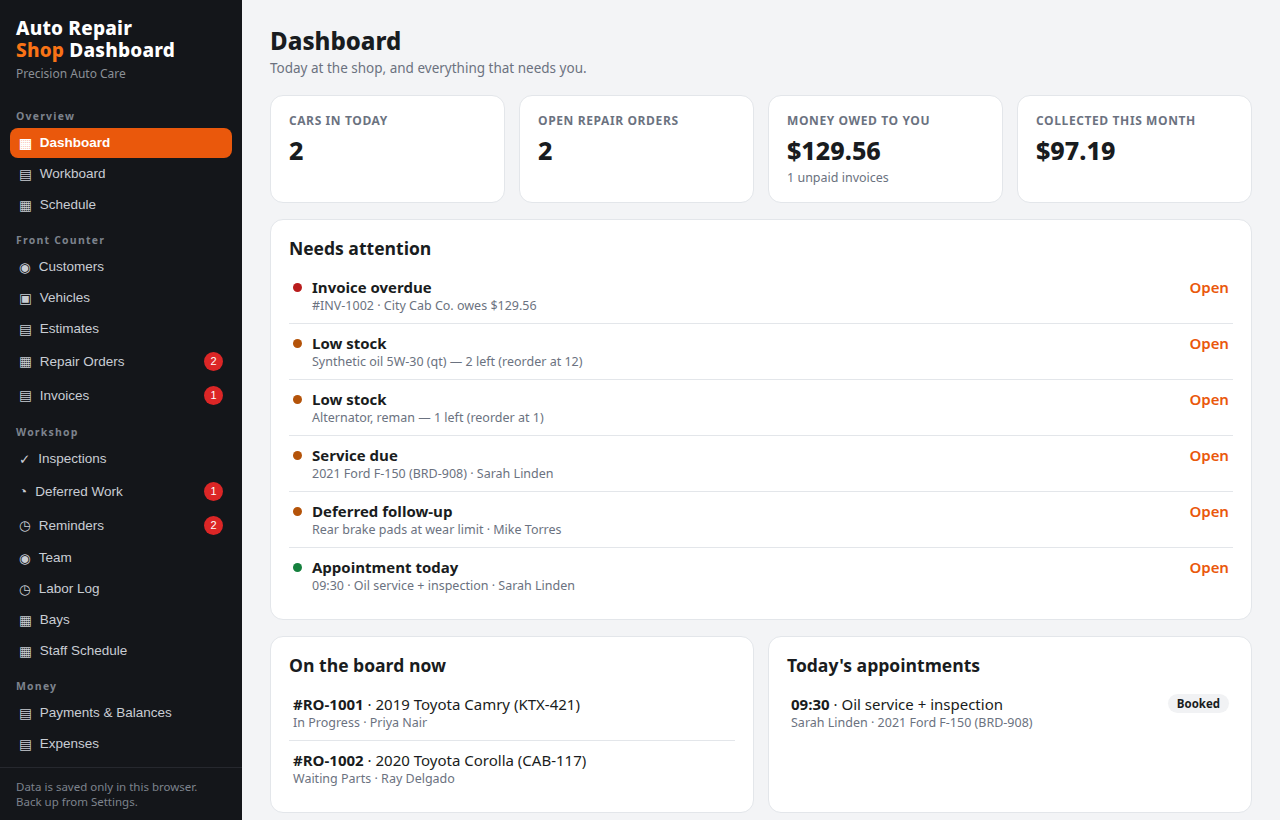
Run the whole shop from one screen: estimates that turn into repair orders, parts that come out of stock by themselves, inspections, invoices and follow-ups. Free to use below, no sign-up, and your data never leaves your browser.
 Launch Dashboard
🔖 Bookmark this page so you never lose your plan. Your data is saved privately in your own browser, and this bookmark brings you straight back to it. Keep enjoying the free stuff!
What is an auto repair shop dashboard?
An auto repair shop dashboard is one screen that runs the daily work of a repair shop: who is coming in, which cars are on which lift, what each job will cost, what has been billed and what is still owed. This one puts your dashboard, workboard, customers, vehicles and repair orders together in a single free tool that runs in your browser, with estimates, inspections, invoices, parts stock and reports in the full version.
How does the estimate to invoice flow work?
You price the job once, as an estimate. When the customer approves it, one click turns it into a repair order and the parts on it come out of your stock automatically. You move the job across the workboard as it moves through the shop, and when it is finished, one more click turns it into an invoice. Nothing is typed twice, and every job shows its profit: what you charged minus what the parts and labor cost you.
Which sections are free, and what does Pro add?
The free version on this page opens five sections with generous limits: the Dashboard, the Workboard, Customers (up to 10), Vehicles (up to 10) and Repair Orders (up to 10). The full Pro version unlocks all 27 sections with no limits: Estimates, Invoices, the Schedule calendar, 28-point Inspections, Deferred Work, Reminders with a printable call sheet, Team and Labor tracking, Bays, Staff Schedule, Payments and aged Balances, Expenses, a Pricing Calculator, Parts Inventory with Purchase Orders, Vendors, Tire Storage, Warranties, a Service Catalog, Service Plans, Shop Tools, Tasks and Notes, an Activity Log, full Reports, and Settings with backup and restore.
Do I need to install anything or create an account?
No. The dashboard is a single file that opens in any modern web browser. There is no installation, no account, no password and no subscription. Open it, and it works, even with no internet connection.
Where is my shop’s data stored?
Only in your own browser, on your own computer. Nothing is uploaded to a server and nothing is saved on any cloud. That is why the bookmark note matters: use the same browser each time, and download a backup from Settings in the Pro version whenever you want a copy you can move or restore.
Can a small shop really run on this?
Yes, that is who it is built for: independent shops and small teams who are priced out of the big subscription systems, or tired of paper job cards and spreadsheets. It covers the front counter (customers, estimates, invoices), the workshop (workboard, inspections, bays, labor) and the back office (parts, purchase orders, expenses, reports) in one place.
Frequently asked questions
Is the Auto Repair Shop Dashboard really free?
Yes. The version on this page is free forever, with the Dashboard, Workboard, Customers, Vehicles and Repair Orders sections open. The Pro version is a one-time purchase that unlocks all 27 sections.
Does it work offline?
Yes. After the page loads, everything runs on your own device. Estimates, repair orders and stock work with no connection at all.
Will it deduct parts from my stock?
In the Pro version, yes. When a repair order is created, its parts come out of Parts Inventory automatically, and deleting the repair order puts them back.
Can I print estimates and invoices?
Yes, in the Pro version estimates, repair orders, invoices and inspection reports all print cleanly, and the Reminders section prints a call sheet for follow-ups.
What happens if I clear my browser data?
Your dashboard data is cleared with it, because it lives in the browser. Download a backup from Settings regularly; restoring takes one click.
Does it send texts or take card payments?
No. It records payments you take (card, cash, transfer, check, fleet account or warranty claim) but it does not process them, and it does not message customers. That keeps it fully offline and private.