

Shop Profit Dashboard
 Launch Dashboard
🔖 Bookmark this page so you never lose your plan. Your shop data is saved privately in your own browser, and this bookmark brings you straight back to it. Keep enjoying the free stuff!
What is this free shop profit dashboard?
This free shop profit dashboard shows handmade and online sellers what they actually keep from every sale. You log your orders, and the dashboard works out the platform fees, your product costs and postage for each one, then shows your real net profit and margin for this month, last month, this year or all time. It is built for Etsy sellers first, with the current Etsy fee structure built in, the $0.20 listing fee, the 6.5% transaction fee, payment processing and Offsite Ads, and every rate can be changed in Settings if your platform charges differently.
What can you do with this Etsy profit tracker?
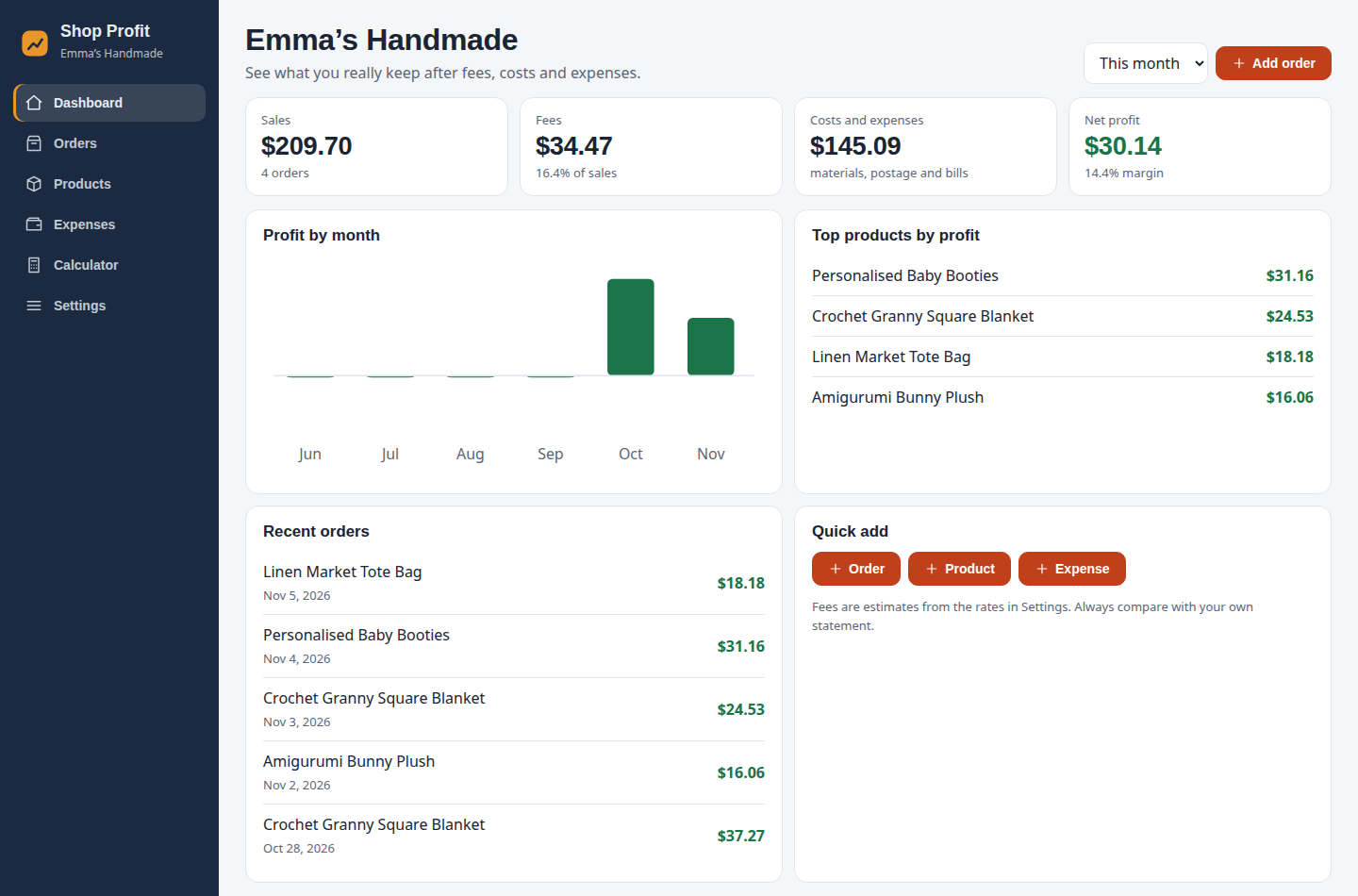
- Profit dashboard: cards for sales, fees, costs and expenses, and your net profit with its margin, switching between this month, last month, this year and all time, plus a six-month profit chart, your top products by profit and your recent orders.
- Order log: record each sale with its price, quantity, shipping charged, postage paid and whether it came through Offsite Ads. Fees, costs and profit are worked out automatically, and you can search orders and filter by month.
- Product profit view: every product shows its profit and margin per item, with a colour tag so weak margins stand out before they quietly drain your shop.
- Expense tracking: log software, tools, supplies and subscriptions by category, so your net profit is honest, not flattering.
- Profit calculator: type in a price, shipping and costs to see the exact profit on a possible listing, plus the break-even price and the price you need for your target margin, before you publish anything.
How do you use this shop profit dashboard?
- Click the Launch Dashboard button above, then open Settings and add your shop name, your currency, and your fee rates if they differ from the Etsy defaults.
- Add your products with their selling prices and what each one costs you to make or buy.
- Log each order as it comes in. Your dashboard cards, chart and top products update instantly.
- Add your expenses as you pay them, and test new prices in the Calculator before changing a listing.
- Download a backup from Settings now and then to keep your shop records safe.
Does this profit dashboard save your data?
Yes. This online profit tracker saves everything automatically in your own web browser using local storage, so your orders, products and expenses are exactly as you left them when you come back on the same device, with no account and no password. Your shop numbers are never sent to a server, which keeps your margins and costs completely private. In Settings you can download a backup file of your whole dashboard, or restore it later on another device.
Profit tips for online sellers
- Know your real margin per product: a product that sells well at a 10% margin can be worse than a slow seller at 50%. The Products view ranks your items so you can push the winners and fix or drop the losers.
- Price the fees in, not on top: use the Calculator to set prices that already include listing, transaction and processing fees, instead of discovering them at payout time.
- Watch Offsite Ads orders: an ad fee of 12 to 15% can turn a good order into a break-even one. Log the ads flag honestly and check those orders in your list.
- Small price rises beat big jumps: test a 5% increase on your best seller first and watch the dashboard for a month. The chart makes the effect obvious.
- Track every expense: subscriptions and supplies are real costs. For the quick maths on a single item, our Etsy Fee Calculator and Etsy Profit Calculator are handy companions.
Is this shop profit dashboard really free?
Yes, this shop profit dashboard is completely free, with no sign-up, no subscription, no locked sections and no limit on orders, products or expenses. The dashboard, order log, product margins, expense tracking and the profit calculator are all free to use for as long as you like.
Do you need an account to use this profit tracker?
No. There is no account, email address or password. The shop profit dashboard works straight away in your browser and saves your data on your own device. If you sell from more than one device, download a backup file from Settings on the first device and import it on the second device to move your records across.
Can you use this shop profit dashboard on your phone?
Yes. This free profit tracker is fully responsive and works on phones, tablets and computers. On a phone, the sections sit in a simple bar at the top, so logging an order right after it sells takes seconds.
Which selling platforms does this profit dashboard work for?
It is set up for Etsy out of the box, including the listing fee, transaction fee, payment processing and Offsite Ads. Because every fee rate can be edited in Settings, it also works for eBay, Shopify, Folksy, Amazon Handmade or your own website: just enter that platform’s rates once and log your orders the same way.
More free dashboards to try
Running a shop is only one part of life. If your products are handmade in yarn, the Crochet Studio tracks your projects, stash, patterns and counters. For the rest of your day, the Focus Dashboard is an ADHD-friendly daily planner with a top-3 list and a focus timer. And if a wedding is on the horizon, the Wedding Planner keeps the checklist, budget and guest list together for free.